Oliviar: A Bold Sans Serif for Web Design
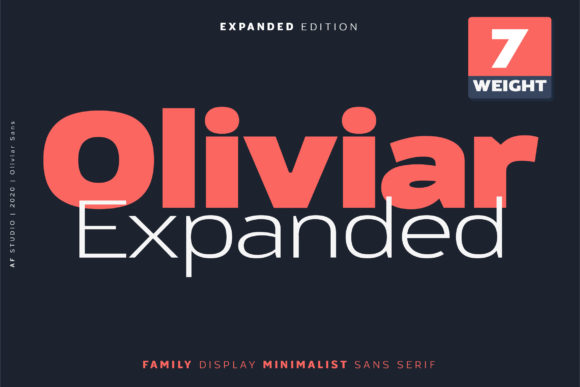
While working on a boutique online store, I found myself searching for a font that could bring a fresh, modern feel without sacrificing clarity. Oliviar caught my eye—it’s a bold and neat lettered sans serif font that feels both confident and clean. It didn’t take long to realize this typeface could be the perfect fit for a variety of digital projects.
Testing Oliviar in a Real-World Layout
I started by testing Oliviar in the hero section of the store’s homepage. The large text stood out against the background image, drawing attention without overwhelming the viewer. Its consistent stroke width and balanced proportions made it easy to read, even at smaller sizes. For a product landing page, it worked well as a headline, giving the layout a polished look that felt professional yet approachable.
On mobile screens, Oliviar maintained its legibility. The font’s open counters and subtle curves helped it scale smoothly, making it ideal for buttons and call-to-action elements. I noticed how it paired well with a simple sans serif for body copy, creating a clear visual hierarchy that guided users through the content without confusion.
When to Use Oliviar
Oliviar is best suited for display purposes rather than body text. It shines in headers, logos, and short phrases where it can make an immediate impact. In a coaching website, I used it for the main navigation and featured testimonials, which added a sense of authority and refinement to the design.
For a creative portfolio site, Oliviar served as the primary heading font, complementing a minimalist color scheme. Its geometric structure gave the layout a modern edge while still feeling grounded. When placed over an image banner, it provided just enough contrast to ensure readability without overpowering the visuals.
In a blog redesign, I experimented with Oliviar for the post titles and subheadings. It brought a sense of rhythm to the layout, helping readers scan through content more efficiently. The font’s versatility allowed it to work across different sections, from article intros to sidebars, without feeling out of place.
Readability and User Experience
One of the key considerations when choosing a font is how it performs in various contexts. Oliviar handled dark backgrounds and light backgrounds well, maintaining a strong presence without straining the eyes. On a promotional landing page with a busy background, it still managed to stand out thanks to its bold weight and clean lines.
For small buttons and inline text, I found that using lighter weights of Oliviar helped keep the design from feeling too heavy. It was especially effective in CTA buttons where the font’s sharp edges created a sense of urgency and action.
When working with image overlays, I adjusted the font size and spacing to ensure it remained readable. Oliviar’s consistent x-height made it easier to balance with other elements, allowing for a cohesive visual flow across the page.
Font Pairing and Brand Consistency
Pairing Oliviar with a complementary font can enhance the overall design. I often used it alongside a simpler sans serif for body text, which created a nice contrast without being jarring. This combination worked well for a course sales page, where the bold headlines grabbed attention while the body copy remained easy to digest.
For a more editorial feel, I paired Oliviar with a serif font for headings and subheadings. This gave the design a classic touch while keeping the modern aesthetic of the main font intact. It was particularly effective for a blog that focused on lifestyle and creativity.
When building a digital brand kit, I made sure to include multiple weights and styles of Oliviar. This allowed for flexibility across different assets, from social media graphics to email templates. The font’s multilingual support also made it a reliable choice for international audiences.
Practical Considerations for Web Designers
Before implementing Oliviar on any project, I always check the available styles, webfont formats, and licensing options. It’s important to ensure the font works across all platforms and devices. For a small business website, I confirmed that the commercial license covered all necessary use cases, including client projects and online stores.
Testing the font on different screen sizes and resolutions is also crucial. Oliviar performed consistently across desktop and mobile views, which is essential for responsive layouts. I made sure to adjust line heights and letter spacing where needed to maintain optimal readability.
Overall, Oliviar has become a go-to font for many of my designs. Its clean, modern appearance makes it ideal for a wide range of digital projects, from creative portfolios to product landing pages. Whether you’re looking to elevate a brand’s visual identity or simply add a touch of sophistication to your layout, Oliviar offers a versatile and stylish solution.
As a web designer, I appreciate fonts that not only look good but also function well. Oliviar checks both boxes, offering a bold and neat lettered sans serif that enhances user experience while adding a unique personality to any design.